Export a Transcript as PDF, DOCX, or Markdown
Generate a readable transcript with selected languages, speakers, timestamps, glossary correction, and approved AI cleanup.
Written By 4ALL.LIVE
Last updated 4 months ago
Generate a readable transcript with selected languages, speakers, timestamps, glossary correction, and approved AI cleanup.
Best for: Authorized producers, analysts, accessibility leads, organization owners, and support staff.
Before you start
Availability depends on role, event access, plan entitlements, retained source data, export/AI/statistics features, and privacy policy.
- Confirm exact organization, event, language, and reporting period.
- Verify requester, recipient, and retention/privacy authorization.
- Preserve raw source data before cleanup, editing, or deletion.
Export steps
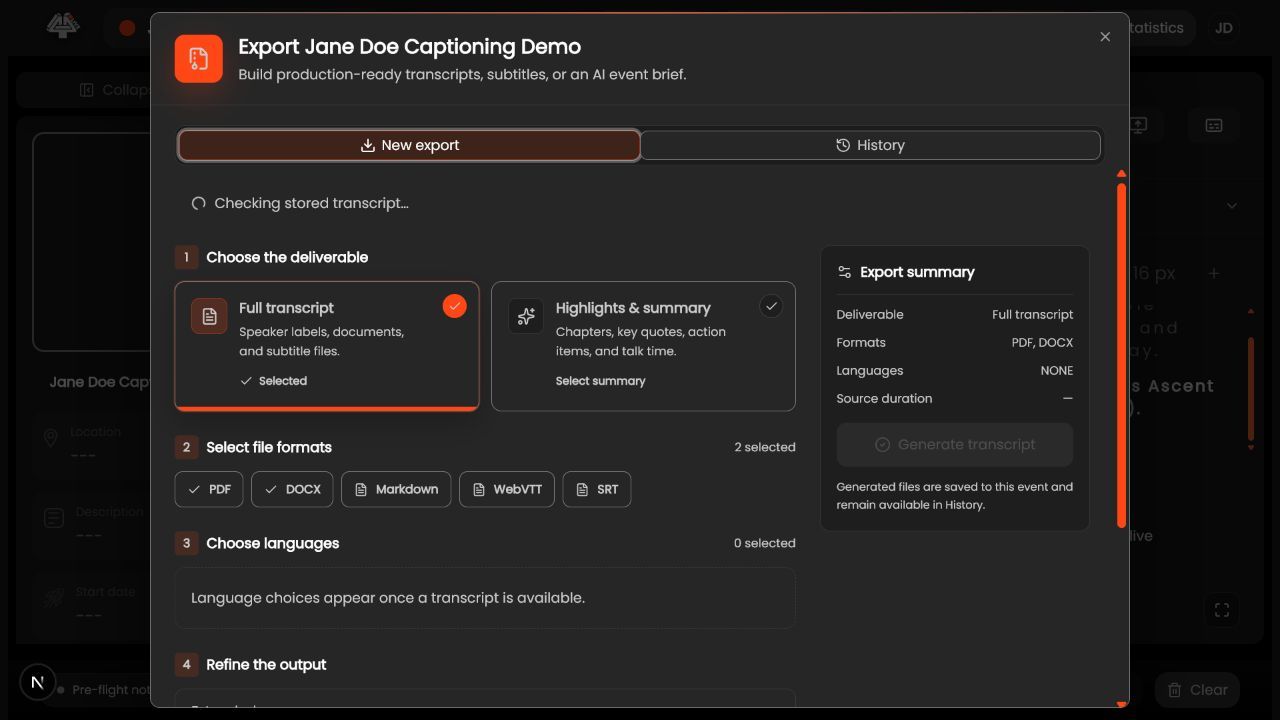
- Open the completed event. Confirm organization/event and retained finalized segments.
- Choose Exports. Select document transcript.
- Choose PDF, DOCX, or Markdown. Use PDF for fixed reading, DOCX for editing, or Markdown for structured text.
- Choose languages and metadata. Include only approved locales, accurate speakers, and necessary timestamps.
- Choose glossary fix or AI cleanup. Use only when authorized and review semantic changes.
- Generate once. Wait for history status.
- Review the whole file. Beginning/end, names, numbers, negation, missing text, languages, speakers, timestamps, privacy.
- Deliver securely. Use an approved recipient/storage path.
What success looks like: The deliverable or analysis is correct for the intended scope, reviewed, reproducible, and protected according to policy.
Check your setup
- File opens in intended app.
- Event/language/version are clear.
- Human review is complete.
Troubleshooting
Export empty
Check finalized segments, language, event, and retention.
Speaker labels wrong
Correct source data or omit unverified identity.
Cleanup changes meaning
Regenerate without it or correct under approved review.
Security and operational notes
- Not automatically a certified verbatim record.
- Protect confidential/personal data.
- Keep raw version.
Related guides
- Export Caption Files as WebVTT or SRT
- Apply Glossary Fixes and AI Cleanup
- Manage Export History and Delivery
Documentation status: Draft for operational, privacy, and analytics review before publishing.
Was this helpful?
Still need help? Ask the team