Clear Transcript, Hotkeys, Screen Wake, and Exit
Use secondary live controls without accidental data loss or on-air changes.
Written By 4ALL.LIVE
Last updated 4 months ago
Use secondary live controls without accidental data loss or on-air changes.
Best for: Organization administrators, event producers, live operators, and authorized support staff.
Before you start
Event access and actions depend on organization role, team scope, plan entitlements, limits, and current event state.
- Use an individual verified account in the correct organization and team.
- Confirm the event owner, live operator, output owner, and incident authority.
- Review the current configuration before changing an existing or live event.
Step by step
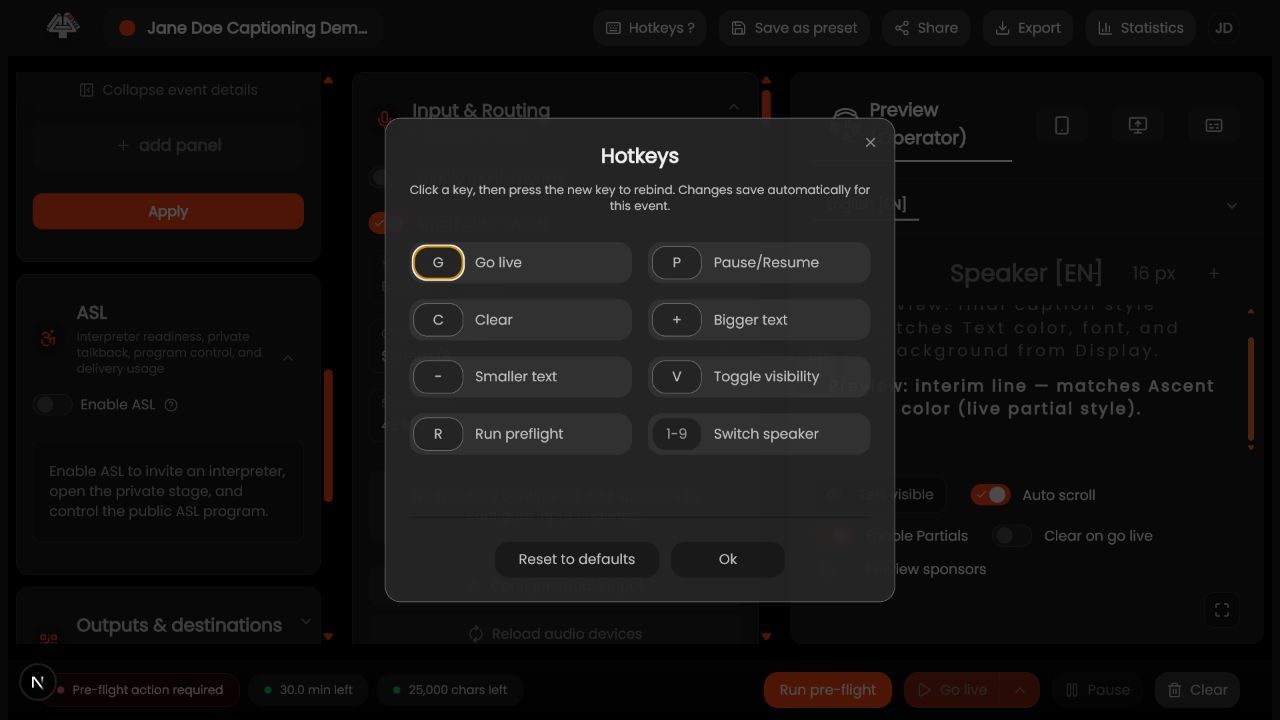
- Learn hotkeys offline. Review the current hotkey reference and test in a rehearsal event.
- Check focus. Do not trigger shortcuts while typing in a field or another app.
- Use screen wake. Keep critical operator/viewer displays awake while respecting device policy and battery/thermal limits.
- Clear transcript only with approval. Confirm event, whether live, export/retention impact, and downstream clearing behavior.
- Use clear once. Wait for confirmation and verify source plus every output.
- Exit/handoff. If live, stop or complete an explicit handoff; if offline, confirm autosave.
- Recover from accidental action. Communicate immediately, inspect audit/state, preserve logs, and follow the event incident plan.
What success looks like: The event reaches the intended saved or live state, and every required operator can verify the result without receiving unnecessary access.
Check your setup
- Operators use shortcuts and display controls predictably; transcript clearing and exit occur only with authorization and verified outcomes.
Troubleshooting
Hotkey does nothing
Check focus, browser/OS conflicts, role, event state, and current shortcut mapping.
Screen still sleeps
Review browser support, OS power policy, kiosk mode, and battery saver.
Transcript cannot be restored
Use preserved exports/logs according to retention design; clearing may be irreversible.
Security and operational notes
- Transcript clearing is destructive.
- Never learn hotkeys during a live customer event.
- Do not leave an authenticated operator screen unattended.
Related guides
- Go Live and Stop Safely
- Audit and Session History
- Export History and Delivery
Was this helpful?
Still need help? Ask the team