Share a Viewer Link and QR Code
Distribute the correct public attendee destination with a scannable, accessible fallback.
Written By 4ALL.LIVE
Last updated 4 months ago
Distribute the correct public attendee destination with a scannable, accessible fallback.
Best for: Event producers, display operators, accessibility leads, broadcast/AV engineers, web teams, and authorized remote operators.
Before you start
Availability depends on event access, plan entitlements, destination enablement, language configuration, and supported browser/display/network behavior.
- Use the correct event and final source/target language configuration.
- Know the physical or web destination, resolution, audience, privacy level, and monitoring owner.
- Test the final receiving screen, embed, graphics path, or operator device—not only the setup preview.
Setup and sharing
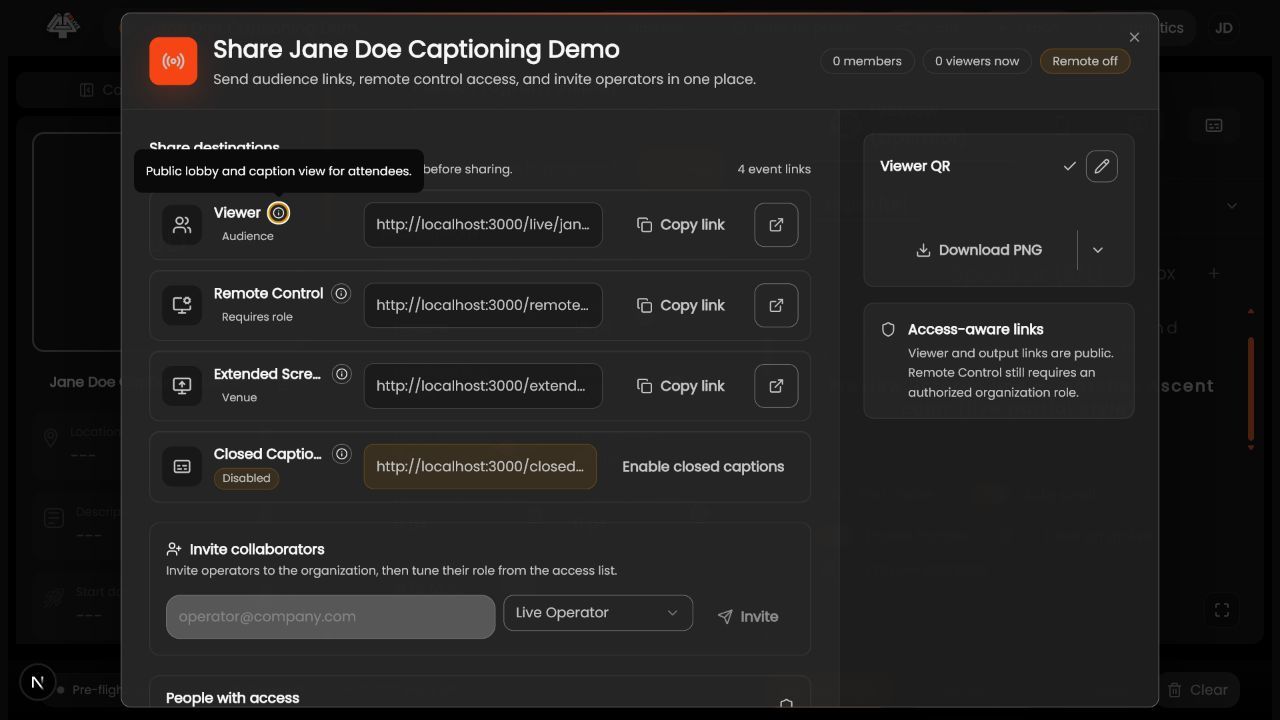
- Open Share. Confirm event and distinguish Viewer from Remote Control and production outputs.
- Copy Viewer link. Use the current official event destination.
- Generate QR. Apply a logo only when entitled and maintain quiet zone/contrast.
- Test signed out. Use phone, desktop, venue Wi-Fi, and mobile data.
- Test physical presentation. Print/project at intended size/distance.
- Provide short-link/text fallback. Not everyone can scan.
- Publish consistently. Update website, signage, slides, email, and staff scripts.
- Monitor. Assign support and view-count/technical owner.
What success looks like: The intended audience or operator receives the correct event, language, styling, and control level with a documented reconnect and fallback path.
Check your setup
- Attendees reach the intended lobby/viewer without authentication and can choose supported accessibility options.
Troubleshooting
QR does not scan
Increase size/contrast/quiet zone and reduce logo coverage.
Link opens wrong event
Stop distribution, regenerate from correct organization/event, and replace all assets.
Viewers see stale event
Check slug/link, live state, cache, and schedule.
Security and operational notes
- Viewer/output links may be public; never confuse them with authenticated controls.
- Treat QR artwork as versioned production material.
- Include privacy information.
Related guides
Was this helpful?
Still need help? Ask the team