Understand Default Roles
Choose among Owner, Admin, Member/Viewer, and custom roles based on responsibility and risk.
Written By 4ALL.LIVE
Last updated 4 months ago
Choose among Owner, Admin, Member/Viewer, and custom roles based on responsibility and risk.
Best for: Owners and administrators.
Before you start
Default roles are always available; custom roles provide finer scope. Viewer is typically the least/baseline access and other roles may be billable.
- Sign in with an individual account in the correct organization.
- Confirm your role permits the requested change.
- Record the current state and intended owner before making a production-impacting change.
What to know
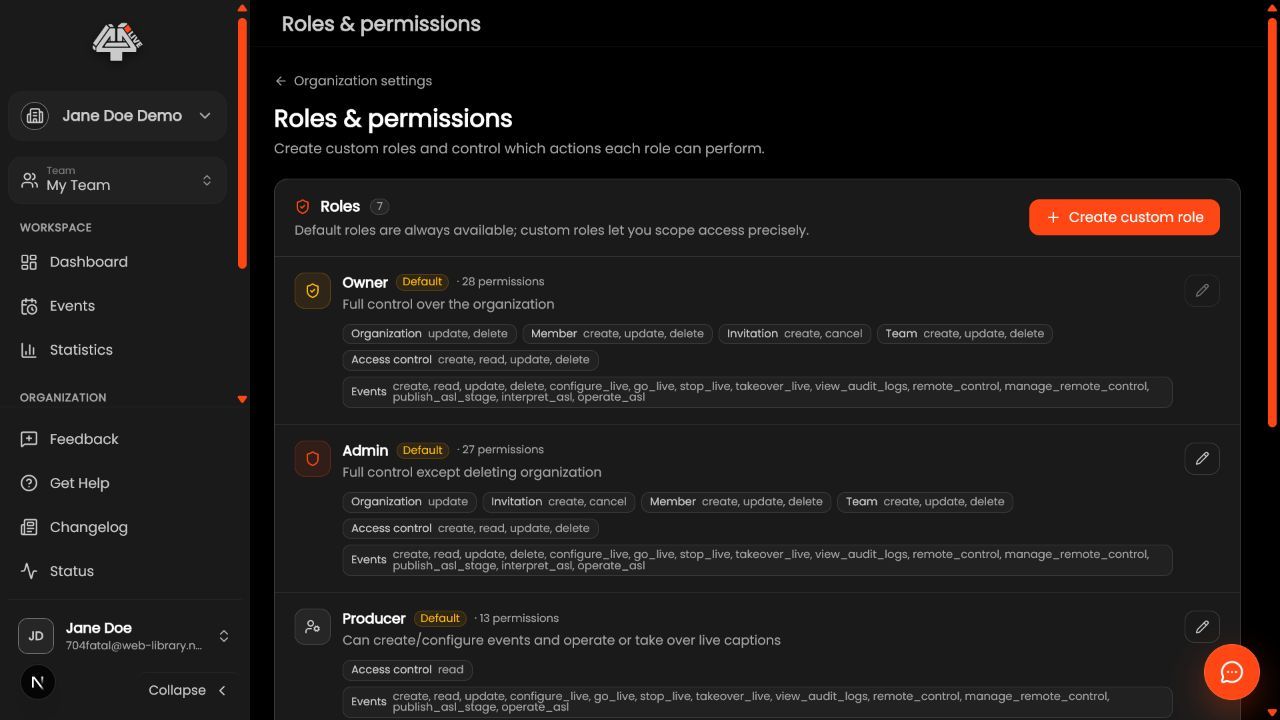
- Owner. Use for accountable organization governance, ownership transfer, destructive controls, and highest-privilege continuity. Keep the count small.
- Admin. Use for broad organization/member/event management without treating every operator as an owner.
- Member or Viewer. Use for ordinary participation or minimal access according to current permission policy.
- Custom role. Use when a production role needs defined event, live, Remote Control, takeover, ASL, export, billing, or configuration actions.
- Compare effective access. Include team and event scope; a role name alone is not the complete answer.
- Review billing impact. Confirm whether the role consumes a paid seat.
- Test before assignment. Validate with a test account, then assign to the minimum group.
What this unlocks: The requested change is applied to the intended organization, is visible after refresh, and grants no more access than required.
Check your understanding
- Each role has an accountable business purpose, tested permissions, and known seat/billing impact.
Common misconceptions
Role name misunderstood
Inspect its actual permission matrix and scope.
Too much access
Replace broad defaults with a tested custom role.
Feature visible but disabled
Check entitlement and event state in addition to permission.
Good to know
- Limit Owner/Admin assignments.
- Do not use shared operator accounts.
- Review role design after product permission changes.
Related guides
Was this helpful?
Still need help? Ask the team