Save, Apply, and Update Setup Presets
Reuse proven event setup while preserving event-specific details and safe review.
Written By 4ALL.LIVE
Last updated 4 months ago
Reuse proven event setup while preserving event-specific details and safe review.
Best for: Organization administrators, event producers, live operators, and authorized support staff.
Before you start
Event access and actions depend on organization role, team scope, plan entitlements, limits, and current event state.
- Use an individual verified account in the correct organization and team.
- Confirm the event owner, live operator, output owner, and incident authority.
- Review the current configuration before changing an existing or live event.
Step by step
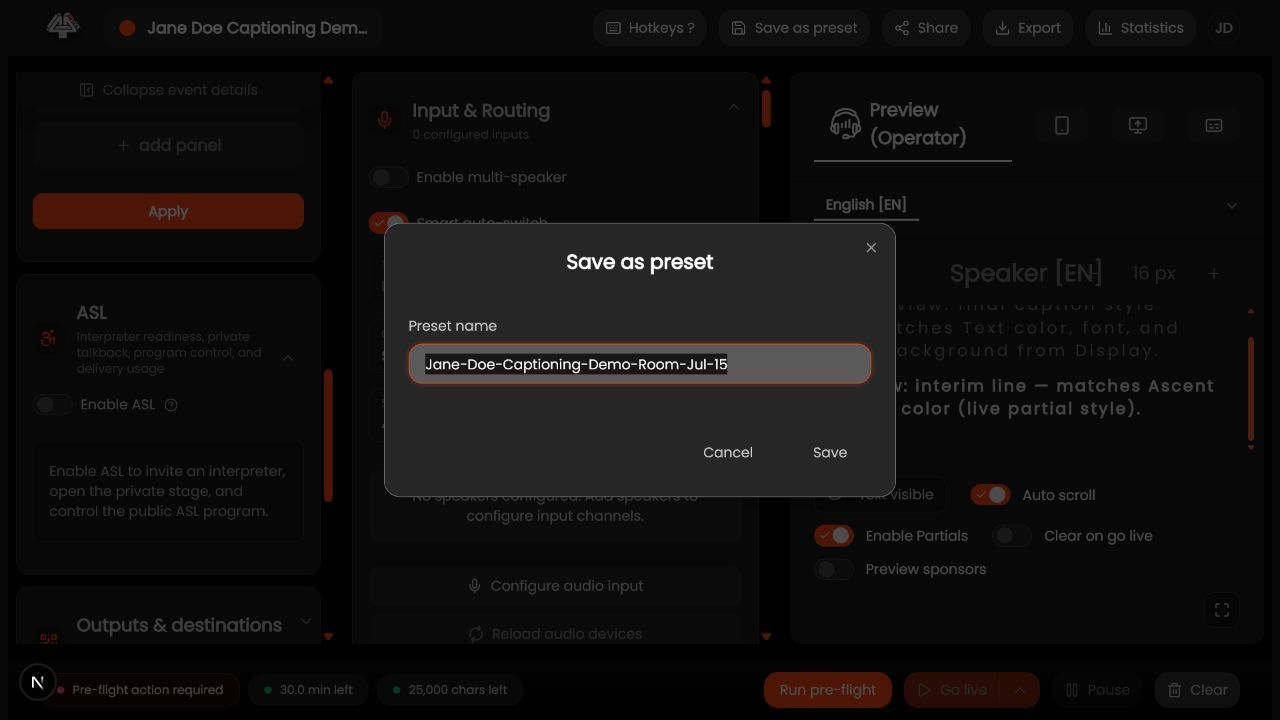
- Finish a validated configuration. Rehearse audio, providers, languages, tuning, displays, and destinations.
- Open preset controls. Choose Save preset and give it a workflow-specific name/description.
- Review included scope. Confirm which settings are captured and which event-specific fields are excluded.
- Save. Record owner, product version, date, hardware assumptions, and intended use in your runbook.
- Apply to a test/new event. Preview changes before going live.
- Run complete preflight. A preset does not prove devices, credentials, entitlements, or network are current.
- Update deliberately. After a validated improvement, update or create a versioned preset.
- Retire stale presets. Stop using configurations tied to removed devices/providers/policies.
What success looks like: The event reaches the intended saved or live state, and every required operator can verify the result without receiving unnecessary access.
Check your setup
- A preset reproduces the intended baseline and the target event passes independent review/preflight.
Troubleshooting
Preset unavailable
Check organization/team scope and role.
Wrong device after apply
Reselect local hardware; device identifiers may not transfer.
Old behavior remains
Confirm preset version and event overrides.
Security and operational notes
- Never treat a preset as an automatic go-live approval.
- Do not store secrets in descriptions.
- Version high-risk broadcast configurations.
Related guides
- Preset Scope, Defaults, and Exclusions
- Setup Wizard
- Preflight and Readiness
Was this helpful?
Still need help? Ask the team